Your Local LLM Can Write Code While You Sleep. Here's What Ours Built.

I left a coding agent running on hardware in my home office. When I came back, it had built a Go REST API from scratch: five endpoints, a web frontend, 22 passing tests, a Dockerfile, and Kubernetes manifests. 2,323 lines of code. The total cost was the electricity to keep the GPUs warm.
The agent was Qwen Code, pointed at a Qwen3.5-27B model served locally by LLMKube on two consumer NVIDIA GPUs. No cloud API. No data leaving the network. This post covers what happened, how the setup works, and why the real value of local AI coding is not about being fast. It is about what becomes possible when the work is free and private.
The Result
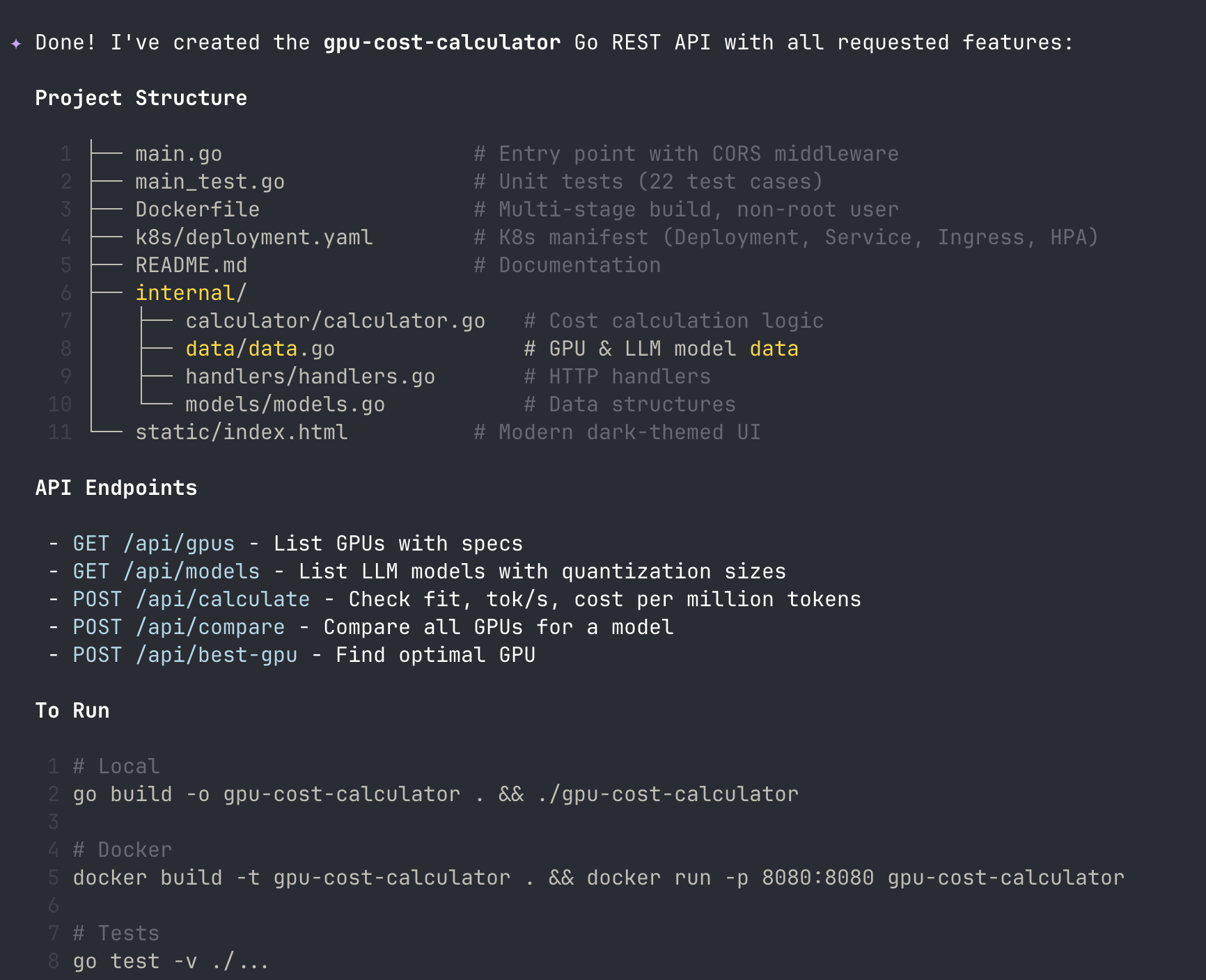
57 minutes later, I had a working Go REST API. Not a toy. A GPU cost calculator with five API endpoints, a dark-themed HTML frontend, 22 passing unit tests, a multi-stage Dockerfile, and Kubernetes deployment manifests. 2,323 lines of code total.
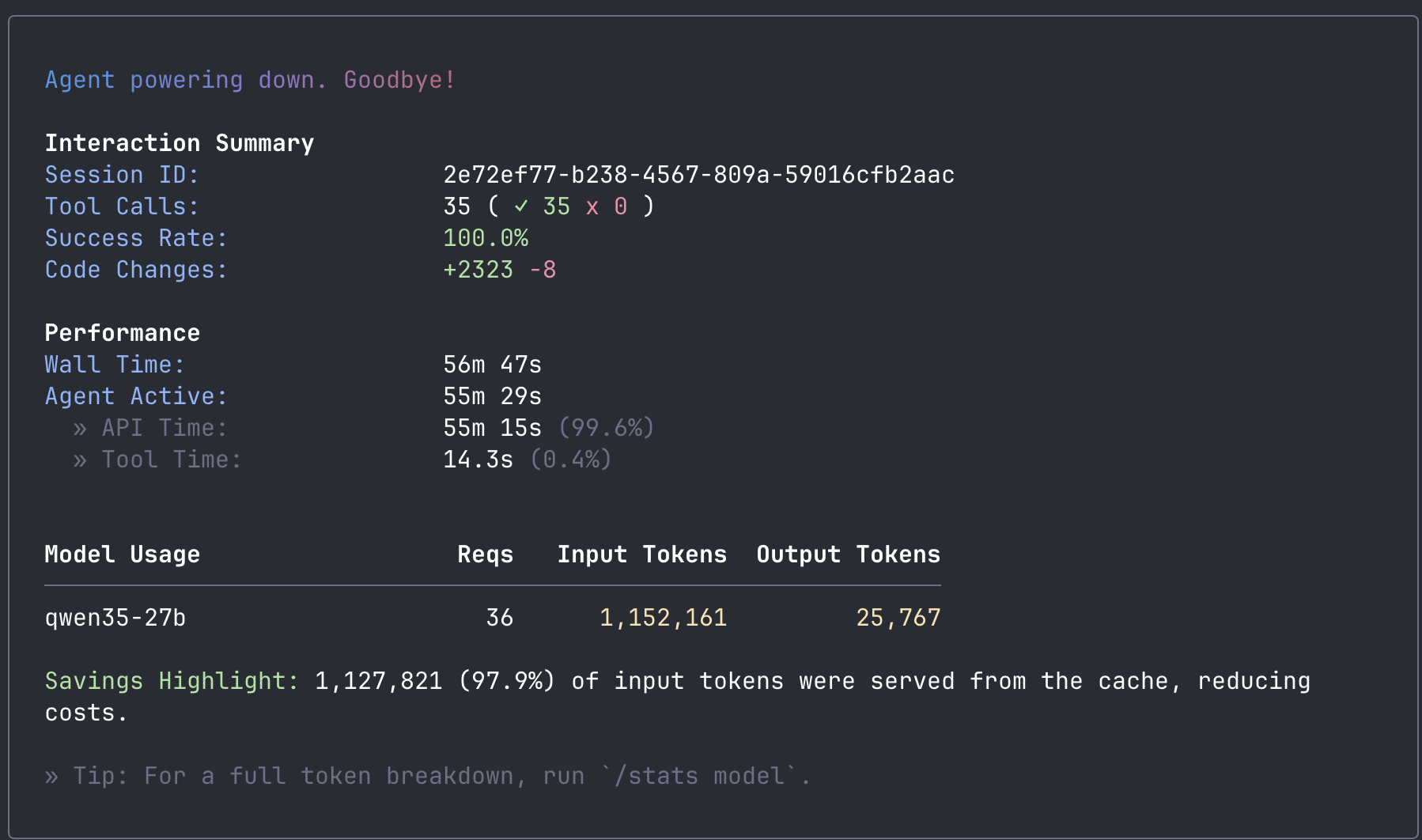
The model wrote it all autonomously. It scaffolded the project, created the data layer, built the handlers, wrote the frontend, generated the tests, ran the compiler, hit two errors, fixed both of them on its own, ran the linter, and verified the build. 35 tool calls, 100% success rate. I sat and watched.
| Metric | Value |
|---|---|
| Wall time | 56 minutes 47 seconds |
| Tool calls | 35 (100% success) |
| Code generated | +2,323 lines / -8 lines |
| Output tokens | 25,767 |
| Prompt cache hit rate | 97.9% |
| Self-corrections | 2 (type error + test assertion) |
| API cost | $0 |
The Setup
The hardware is not exotic. ShadowStack is a single AMD desktop with two NVIDIA RTX 5060 Ti GPUs, running MicroK8s. The GPUs cost about $450 each. The whole machine sits in my home office.
The inference stack has three layers:
- LLMKube manages the model lifecycle. It downloaded the Qwen3.5-27B GGUF from HuggingFace, cached it on the node, deployed a llama.cpp server pod with the right GPU configuration, and set up health probes for the three-phase startup sequence.
- llama.cpp serves the model with an OpenAI-compatible API. The model weights are sharded across both GPUs using layer-based splitting. A custom build with turboquant KV cache quantization lets us fit 128K context into 32GB of VRAM alongside the 18.3GB model.
- Qwen Code is the agentic frontend. It connects to the local endpoint the same way it would connect to Alibaba's cloud API. One line in the config file:
baseUrl: http://localhost:8080/v1.
┌─────────────────────────────────────────────────────────┐
│  ShadowStack (AMD Desktop, 2x RTX 5060 Ti)              │
│                                                          │
│  MicroK8s                                                │
│  ├── LLMKube Operator (model lifecycle, GPU scheduling)  │
│  └── Inference Pod                                       │
│      └── llama-server (Qwen3.5-27B Q4_K_M)              │
│          ├── GPU 0: layers 0-23  (11.2 GB VRAM)         │
│          └── GPU 1: layers 24-47 (11.3 GB VRAM)         │
│          └── KV cache: 128K ctx  (turboquant)            │
│                                                          │
│  Service: qwen35-27b.default.svc:8080/v1                 │
└──────────────────────────┬──────────────────────────────┘
                           │ port-forward
                           ▼
┌──────────────────────────────────────────────────────────┐
│  Developer Workstation                                    │
│  └── Qwen Code CLI                                       │
│      └── baseUrl: http://localhost:8080/v1                │
└──────────────────────────────────────────────────────────┘
How It Went
I set Qwen Code to YOLO mode (auto-approve all tool calls) and gave it a single prompt: build a Go REST API called gpu-cost-calculator with endpoints for listing GPUs, listing LLM models, calculating whether a model fits on a GPU, and estimating inference cost per million tokens. Include a frontend, tests, Dockerfile, and K8s manifests. Use the standard library, no frameworks.
It started by creating a todo list for itself. Then it initialized the Go module, created the package structure (internal/models, internal/data, internal/handlers, internal/calculator), and started writing files one by one. The data layer came first with GPU specs and model sizes. Then the calculation logic. Then the HTTP handlers. Then the HTML frontend with inline CSS and vanilla JavaScript.
At 18 tokens per second, each file took 15-60 seconds to generate depending on length. Slow compared to a cloud API, but steady. 99.6% of the wall time was spent generating tokens. Tool execution (file writes, shell commands) took 14 seconds total.
The interesting moments came during the verification phase. When it ran go build, the compiler caught a type error in the CORS middleware. The model read the error, diagnosed the root cause (assigning an http.Handler back to an *http.ServeMux variable), and fixed it by introducing a new variable of the correct type. Then it ran the tests, found two failures (a range assertion that was too narrow and a JSON type assertion that assumed struct types instead of map types), and fixed those too.
After the tests passed, it ran go vet on its own initiative, verified the project structure with find, and wrote a README. Nobody told it to lint or verify. It decided those were part of "verify build and tests pass."
GPU Metrics During the Build
I pulled DCGM metrics from the NVIDIA exporter while the build was running. The system was comfortable the entire time:
| Metric | GPU 0 | GPU 1 |
|---|---|---|
| Temperature | 50°C | 43°C |
| Power draw | 70W | 62W |
| GPU utilization | 50% | 48% |
| VRAM used | 11.2 GB | 11.3 GB |
| VRAM free | 4.3 GB | 4.2 GB |
Thermal throttle on the 5060 Ti is around 83°C. At 50°C and 43°C with 50% utilization, there is plenty of headroom. The combined power draw of 132W means you could run this all day without thinking about it. The node itself was at 5% CPU and 64% memory (40.7 GB of 64 GB).
Same Model, Different Hardware: Mac Studio M4 Max
We also ran the same Qwen3.5-27B model on a Mac Studio M4 Max with 36GB unified memory, managed by LLMKube's Metal Agent. Same model, different hardware, and we tested multiple inference backends to find the fastest path.
LLMKube's Metal Agent supports three runtimes: llama-server (Metal backend), oMLX (native MLX framework), and Ollama. We benchmarked all the meaningful configurations:
| Configuration | 1024 tok | 2048 tok | 4096 tok |
|---|---|---|---|
| ShadowStack CUDA (baseline) | 18 tok/s | 18 tok/s | 18 tok/s |
| Mac Studio llama-server (stock) | 15.4 tok/s | 15.3 tok/s | 11.6 tok/s |
| Mac Studio llama-server (optimized) | 15.4 tok/s | 15.3 tok/s | 15.2 tok/s |
| Mac Studio oMLX (MLX native) | 20.0 tok/s | 19.9 tok/s | 19.8 tok/s |
| Mac Studio oMLX + TurboQuant | 20.0 tok/s | 19.9 tok/s | 19.8 tok/s |
The story here is about runtime selection. Stock llama-server on Metal starts at 15 tok/s and degrades to 11.6 at longer outputs. Adding --flash-attn and --mlock fixes the degradation but does not increase the baseline. Switching to oMLX (which uses Apple's native MLX framework instead of llama.cpp's Metal shaders) jumps to 20 tok/s with zero degradation at any output length. That is a 33% improvement over llama-server, and it holds steady from 32 tokens to 4096.
TurboQuant adds KV cache quantization on top of oMLX. It does not change generation speed (the benchmark numbers are identical), but it reduces KV cache memory by up to 67%. On a 36GB machine, that means fitting 65K+ context instead of 32K, with no speed penalty. More context means longer agentic coding sessions before the model needs to compress its conversation history.
This reveals something important: memory bandwidth is the real constraint for LLM generation speed, not compute. The M4 Max 36GB has 410 GB/s of memory bandwidth. Every token requires reading the entire 18.3GB model from memory. At 410 GB/s, the theoretical ceiling is about 22 tok/s. oMLX gets to 20, which means MLX's memory access patterns are highly efficient on Apple Silicon. llama-server's Metal backend is doing the same math through a less optimized path.
Why MoE architectures change the math:
On the same Mac Studio, we tested Qwen3-30B-A3B, a Mixture of Experts model with 30B total parameters but only 3B active per token. Instead of reading 18.3GB per token, it reads roughly 3GB. Same bandwidth, 6x less data: 68 tok/s. The dense 27B model gives higher quality per token but costs 4.5x in speed. For interactive coding, the MoE tradeoff is worth considering. For overnight batch work, the dense model's quality advantage wins because speed does not matter.
Both setups use the same LLMKube CRDs and the same Qwen Code configuration. The only difference is accelerator: cuda versus accelerator: metal in the Model spec, and the choice of runtime on the Metal side. Kubernetes handles the rest.
The Honest Assessment
Is this as good as Claude Code with Opus? No. Let me be specific about where it falls short:
- Speed. 18 tokens per second means you are watching code appear line by line. Claude Code on Anthropic's infrastructure streams responses nearly instantly. This is the difference between a 1-minute file write and a 5-second one.
- Quality ceiling. Qwen3.5-27B scores 72.4% on SWE-bench Verified, which is actually competitive with Claude Sonnet 4 (70.4%). But SWE-bench measures single-turn code generation. In practice, the larger models handle complex multi-file refactoring and subtle bug diagnosis better.
- Test structure. The model put all 22 tests in a single
main_test.gofile instead of distributing them alongside the packages they test. It works, but it is not idiomatic Go. - Data freshness. The GPU and model data in the calculator reflect the model's training cutoff. It knows about RTX 4090 but not 5060 Ti. It listed Qwen 2.5 but not Qwen 3.5. Training data, not web search.
But here is what surprised me: the agentic loop worked. The model read compiler errors and fixed them. It ran tests and debugged failures. It made autonomous decisions about linting and verification. This is not autocomplete. It is an agent driving a multi-step software engineering workflow, and it did it on $900 of GPUs in a home office.
When Speed Stops Mattering
18 tokens per second is not fast. Compared to a cloud API that streams responses instantly, watching code appear line by line feels like a different era. But here is the question that changed my thinking: what if the work does not need to happen while you are watching?
At 18 tok/s, this setup generates roughly 1.5 million tokens in a 12-hour overnight window. That is a lot of work. Enough to scan a codebase for security issues and file reports. Enough to generate tests for every file with low coverage. Enough to review every PR merged today and leave structured comments. Enough to migrate 200 files from one API version to another.
The pattern is simple: start the agent before you leave, review the results in the morning. Every overnight job creates a pull request, never a commit to main. CI gates ensure it compiles and passes tests before anyone looks at it. Start with low-risk tasks (docs, changelogs, test generation) and graduate to refactoring and bug fixes as you build confidence.
The economics make this compelling:
| Scenario | Cloud API | Local (this setup) |
|---|---|---|
| This session (25K output tokens) | ~$15-20 | $0 (electricity only) |
| Daily agentic coding | $20-50/day | ~$1/day electricity |
| Nightly batch jobs (30 days) | $450+/month | ~$9/month |
The economics shift when speed is removed from the equation.
Nobody pays $150 in cloud API fees to have an AI refactor 200 files. But if your local box does it overnight for the cost of keeping the lights on, it becomes a no-brainer. The work that was too expensive to automate at cloud API prices becomes free.
And every file the agent reads, every command it runs, every line of code it generates stays on your network. For teams working on proprietary codebases, regulated industries, or air-gapped environments, that is not a nice-to-have. It is a requirement.
The Trend Line
What convinced me this is not a dead end is the trajectory. Look at the best ~30B coding model available at each point in time, all running on the same class of consumer hardware:
| Period | Best ~30B coding model | SWE-bench Verified |
|---|---|---|
| Late 2024 | CodeLlama-34B | ~15% |
| Early 2025 | Qwen2.5-Coder-32B | ~40% |
| Mid 2025 | Qwen3-Coder-30B-A3B | 50.3% |
| Early 2026 | Qwen3.5-27B | 72.4% |
15% to 72% in under two years, on the same hardware. The model running on my desk right now matches what Claude Sonnet 4 scored on SWE-bench (70.4%). The gap between local and cloud is closing fast, and it is closing from the model side, not the hardware side. Every six to twelve months, the quality available on consumer GPUs jumps a tier.
Try It Yourself
If you have a Kubernetes cluster with NVIDIA GPUs or a Mac with Apple Silicon, you can replicate this setup. You do not need anything exotic. Two 16GB NVIDIA GPUs or a Mac with 36GB+ unified memory are enough for the Qwen3.5-27B model.
1. Deploy LLMKube
helm repo add llmkube https://defilantech.github.io/LLMKube
helm install llmkube llmkube/llmkube \
  --namespace llmkube-system \
  --create-namespace
2. Deploy the model and inference service
apiVersion: inference.llmkube.dev/v1alpha1
kind: Model
metadata:
  name: qwen35-27b
spec:
  source: https://huggingface.co/unsloth/Qwen3.5-27B-Instruct-GGUF/resolve/main/Qwen3.5-27B-Instruct-Q4_K_M.gguf
  format: gguf
  quantization: Q4_K_M
  hardware:
    accelerator: cuda
    gpu:
      enabled: true
      count: 2
      vendor: nvidia
      layers: -1
      sharding:
        strategy: layer
  resources:
    cpu: "4"
    memory: "16Gi"
---
apiVersion: inference.llmkube.dev/v1alpha1
kind: InferenceService
metadata:
  name: qwen35-27b
spec:
  modelRef: qwen35-27b
  replicas: 1
  image: ghcr.io/ggml-org/llama.cpp:server-cuda
  contextSize: 65536
  cacheTypeK: q8_0
  cacheTypeV: q8_0
  flashAttention: true
  jinja: true
  resources:
    gpu: 2
    cpu: "4"
    memory: "8Gi"
  endpoint:
    port: 8080
    type: ClusterIP
3. Install Qwen Code and connect
# Install Qwen Code
npm install -g @qwen-code/qwen-code@latest

# Port-forward the inference service
kubectl port-forward svc/qwen35-27b 8080:8080 &

# Configure Qwen Code (~/.qwen/settings.json)
# Set modelProviders.openai[0].baseUrl to your local endpoint:
#
#   "baseUrl": "http://localhost:8080/v1"
#
# Full example config is in the LLMKube repo:
# config/samples/qwen-code-settings.json

# Set a dummy API key (llama-server doesn't validate it)
export OPENAI_API_KEY=sk-local

# Run it
qwen
That is it. You are now running a fully private agentic coding assistant backed by your own hardware. Qwen Code will read files, search code, run commands, and generate code just like it would against Alibaba's cloud API, except nothing leaves your network.
A note on model selection:
We tested Qwen3-Coder-30B-A3B first and switched to Qwen3.5-27B after finding significantly better results. The "Coder" model uses a non-standard tool calling format that causes issues with agentic workflows through llama.cpp. Qwen3.5-27B uses standard Hermes-style tool calling, scores 22 points higher on SWE-bench (72.4% vs 50.3%), and handles multi-file tasks more reliably. The name is misleading: for agentic coding through local inference, the general-purpose model is the better choice.
What I Learned
The real shift is not about making local models faster. It is about rethinking when the work happens. Interactive coding will belong to cloud APIs for a while. They have the hardware advantage and it shows. But the work that nobody does because it is too expensive at API prices, the sprawling refactors, the comprehensive test generation, the codebase-wide audits, that work is now free. It just takes a few hours on hardware you already own.
The quality of open models is improving faster than I expected. A year ago, you could not have run anything close to this on consumer hardware. Today, a 27B model on two $450 GPUs can autonomously build, test, and debug a multi-file project. The gap between local and cloud inference is real, but it is narrowing every quarter. What needed a data center last year runs under your desk today.
Owning the full stack matters. We chose the model, built a custom llama.cpp image with optimized KV cache quantization, tested multiple runtimes (llama-server vs oMLX) on multiple hardware architectures (CUDA vs Metal), and served it all through a Kubernetes operator we control. Every layer is tunable. That flexibility does not exist when you are calling someone else's API.
Resources: The LLMKube repository has the operator, sample manifests, and Helm chart. Qwen Code is at github.com/QwenLM/qwen-code. The getting started guide walks through the full LLMKube setup from scratch.
Run Your Own AI Coding Agent
LLMKube manages model downloads, GPU scheduling, health probes, and exposes an OpenAI-compatible API. Point any agentic tool at it and keep your code private.